Quick Start
LET’S GET YOU
ON THE WATER
Follow these steps to go from plugged in to live engine data — most riders are up and running in under five minutes.
Current firmware release is v1.0.3. Make sure you’re running the latest — check in Settings → Firmware.
Wi-Fi password
aquatrax
Dashboard
aquaboost.local
Backup address
192.168.4.1
Forget them on the water? All three are printed on the board itself.
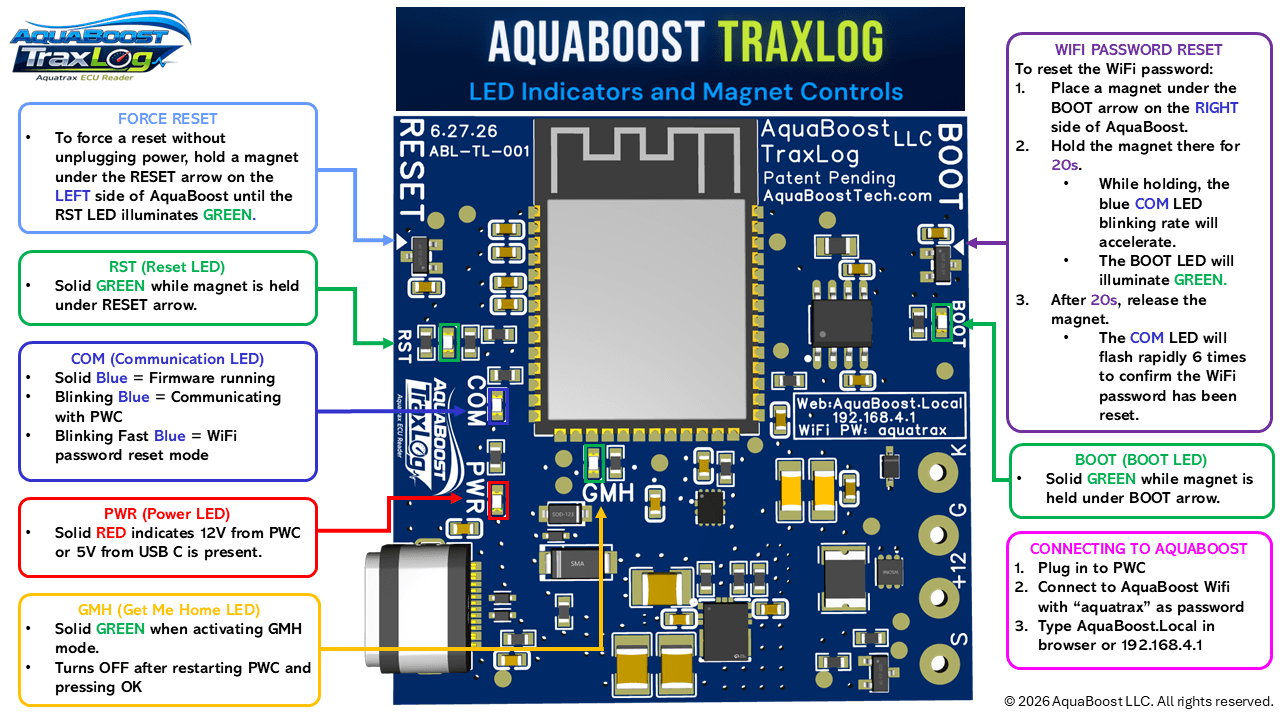
Read the lights
What they meanAquaBoost has power — 12V from your AquaTrax, or 5V over USB-C.
Firmware is running and the device is ready.
AquaBoost is communicating with your AquaTrax.
AquaBoost is communicating with your AquaTrax and running in Flight Recorder mode — actively recording ride data to the device.
Wi-Fi password reset. The blink speeds up while you hold a magnet under the BOOT arrow, then flashes six times to confirm the password has been reset.
Get Me Home Mode is armed. The light goes out once you restart the PWC and press OK.
A magnet is held under the RESET arrow, on the left side. Keep holding to force a restart without unplugging power.
A magnet is held under the BOOT arrow, on the right side. Holding it for 20 seconds starts a Wi-Fi password reset.
Set it up
- 01
Plug in AquaBoost
Plug AquaBoost into the red DLC port on your Honda AquaTrax — under the seat, near the front oil tank — then clip in the safety lanyard.
- 02
Look for the red light
The red PWR light comes on the moment AquaBoost has power.
- 03
Join the AquaBoost Wi-Fi
On your phone, tablet, or computer, connect to the AquaBoost Wi-Fi network. The default password is
aquatrax— you can change it anytime in Settings. - 04
Open the dashboard
In any browser, go to
aquaboost.localor192.168.4.1. On Android, use192.168.4.1— Android often won't resolve.localaddresses. - 05
Save it to your home screen
In your browser menu, choose Add to Home Screen. The dashboard then opens from an icon like any other app — still nothing to download.
Connect before you start the engine
AquaBoost connects to your AquaTrax automatically — but only before the engine is running. If the craft is already started, the AquaTrax won’t allow a connection. Connect first, then fire it up.
Logging your rides
Two waysAquaBoost can record a ride two ways. They are independent — run either, both, or neither.
Browser logging
Start and stop it yourself with the Log button, then export a CSV when you’re done. The log is held in your phone’s browser, so the phone has to stay connected with the browser open — closing the tab, locking the screen, or riding out of range ends it.
Device logging (Flight Recorder)
Turn on Settings → Log to AquaBoost. From then on AquaBoost records every ride onto its own storage — it starts when the engine runs and saves the ride a few seconds after you stop. No phone needs to be connected. Download rides later from the Backup tab.
Once Flight Recorder is on
- The switch lives on AquaBoost, not your phone. It stays on through key-off, a battery disconnect, even a new phone — until you come back and turn it off.
- You can tell it is recording by the blue COM light: it flashes twice in quick succession and then pauses, instead of the steady blink it shows when it is only talking to the ECU.
- Fault codes are recorded the moment they appear, with nobody watching.
- Storage is about 5 MB. When it fills, the oldest ride is deleted to make room, so recording never stops — download anything you want to keep.
Split a ride without stopping the engine
Turn on Settings → Start a New Log on OTS Hold. Holding the handlebars all the way left or right for 10 seconds then closes the ride being recorded and begins a new one, so the run up to that point is its own file. Off-throttle steering engages on its own every time you back off the throttle, so brief activations are ignored — only a sustained hold splits the log.
View your log reports
After the rideEvery session AquaBoost records can be read two ways.
On the device
Open the dashboard and choose View Logs. Reports are generated on AquaBoost itself.
In any browser
Export a CSV, then open it at AquaBoostTech.com/view-logs. The file is read in your browser.
Keep the firmware updated
Over the airThe latest firmware is v1.0.3. To install it, go to Settings → Firmware → Check Latest Firmware in the dashboard.
Before you update
- Make sure AquaBoost has stable power for the whole update — don’t unplug it partway through.
- An internet connection is required — Wi-Fi, or your phone’s cellular connection.
Faster on your own Wi-Fi
Connect AquaBoost directly to your home or marina Wi-Fi network for faster over-the-air updates. Once it’s on a network, it checks for new firmware automatically.
The USB-C port
Good to know- It works as a secondary power source — keeping AquaBoost powered steadily even when the AquaTrax is turned off.
- It can also power AquaBoost when it isn’t plugged into the PWC — from a phone, computer, or battery pack.
Keep it sealed on the water
Leave the rubber plug installed whenever AquaBoost is on the water. Salt water reaching the USB-C port can damage the device — keep the port covered any time you’re out.
If the port is already damaged
- Try cleaning it with rubbing alcohol.
- The included 4-pin DLC to USB cable is a backup power source — it powers AquaBoost without using the USB-C port.
About your phone
Any phone worksThere is no app to install. AquaBoost hosts the web app itself, so anything with a reasonably modern browser can run it.
An old phone is fine
An older spare phone works well. Two things to know on that hardware: if aquaboost.local does not load, type 192.168.4.1 into the browser instead — older Android versions often cannot resolve .local names — and on slower phones the live charts may redraw a little more slowly. Gauges, fault codes, and logging are unaffected.
More than one at a time
Up to four phones, tablets, or computers can be connected at once, and each one sees the live data independently — handy when a rider and a technician both want to watch the same session.
Internet and text messages while connected
On iPhone, cellular data keeps running while you are connected to AquaBoost. Android is less predictable: because the AquaBoost network has no internet of its own, some Android versions stop routing data over cellular while you are joined to it, which can block browsing and text messages.
The fix: connect the other way around
Instead of joining the AquaBoost Wi-Fi, have AquaBoost join your phone.
- 1.Turn on your phone’s mobile hotspot.
- 2.In the web app, go to Settings → Internet WiFi for OTA Updates → Scan.
- 3.Select your hotspot and enter its password.
- 4.Once AquaBoost connects it displays an IP address. Type that address into your phone’s browser.
Your phone stays on cellular the whole time, so browsing and texts keep working, and you no longer need to join the AquaBoost Wi-Fi network. If your phone has no cell service, none of this applies — connect to AquaBoost directly.
No phone needed at all
In Flight Recorder mode AquaBoost records every ride on its own. You need a phone once to switch it on under Settings → Log to AquaBoost, and again when you want to pull rides off the module from the Backup tab.
Get help from the community
Rider-run groupsShare a log or a fault code with riders who know these Hondas better than anyone.
Know your board
ReferenceEvery LED and magnet control on AquaBoost, in one place — including how to force a reset and reset your Wi-Fi password with a magnet.
Stuck on a step? Get in touch and we’ll help you get connected.
FCC Compliance Statement
Contains FCC ID: 2AC7Z-ESPS3WROOM1
CAUTION: The manufacturer is not responsible for any changes or modifications not expressly approved by the party responsible for compliance. Such modifications could void the user’s authority to operate the equipment.
NOTE: This equipment has been tested and found to comply with the limits for a Class B digital device, pursuant to part 15 of the FCC Rules. These limits are designed to provide reasonable protection against harmful interference in a residential installation. This equipment generates, uses, and can radiate radio frequency energy, and if not installed and used in accordance with the instructions, may cause harmful interference to radio communications. However, there is no guarantee that interference will not occur in a particular installation. If this equipment does cause harmful interference to radio or television reception, which can be determined by turning the equipment off and on, the user is encouraged to try to correct the interference by one or more of the following measures:
- – Reorient or relocate the receiving antenna.
- – Increase the separation between the equipment and receiver.
- – Connect the equipment into an outlet on a circuit different from that to which the receiver is connected.
- – Consult the dealer or an experienced radio/TV technician for help.
Supplier’s Declaration of Conformity
47 CFR § 2.1077 Compliance Information
Product Name: AquaBoost TraxLog
Product Model: ABL-TL
Manufacturer:
AquaBoost LLC
160 Adams Ave Unit D #2005
Hauppauge, NY 11788
support@AquaBoostTech.com
www.AquaBoostTech.com
Modular Components Used:
NAME: 2.4 GHz Wi-Fi (802.11b/g/n) and Bluetooth® 5 module
MODEL: ESP32-S3-WROOM-1-N16R8
FCC ID: 2AC7Z-ESPS3WROOM1
This device complies with part 15 of the FCC Rules. Operation is subject to the following two conditions: (1) This device may not cause harmful interference, and (2) this device must accept any interference received, including interference that may cause undesired operation.